
Most people meet programming as text on a screen. You type something, press run, and a line of output appears in a terminal. It is clean, logical, and completely invisible. For a lot of students, that is where the interest quietly dies: the code works, but nothing happens.
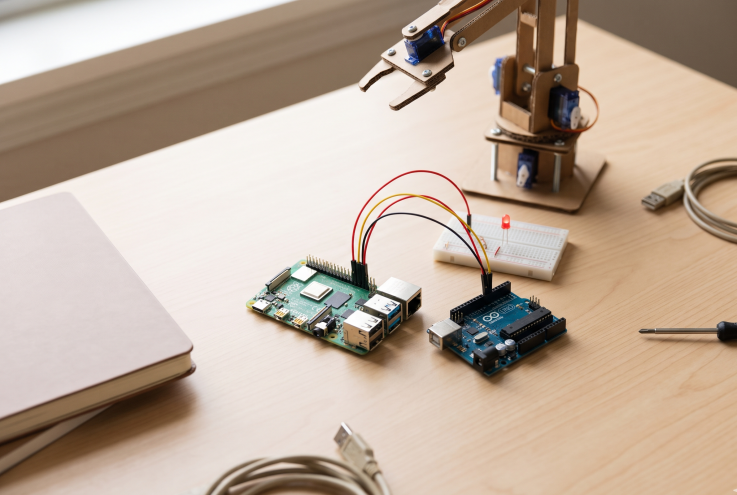
Open source hardware changes that in about thirty seconds. You wire a resistor and an LED to a microcontroller, upload six lines of code, and the LED blinks. Then you change a number and it blinks faster. Then you add a button and suddenly the thing responds to you. That is the moment the abstract becomes physical, and it is the reason a cheap board on a desk has done more for technology education than a decade of slide decks.
A blinking LED that changes everything
The appeal is not really the LED. It is the feedback loop. Software alone asks students to hold several layers of abstraction in their heads at once: variables, loops, functions, state. Hardware compresses that. The circuit is sitting right there. If it does not light up, the answer is somewhere in front of you, and you can find it with your hands.
That immediacy does something specific to the way people learn. A loop stops being a syntax rule and becomes “this repeats until I tell it to stop.” A conditional stops being an if statement and becomes “the light comes on when the room gets dark.” For school students meeting these ideas for the first time, and for self-taught enthusiasts who bounced off a textbook, that shift is the whole game.
It also makes failure cheap and visible. A wrong wire does not crash a server or corrupt a database. It just does nothing, or it gets warm, or the LED stays dark. You unplug it, look again, try something else. Ten minutes later you are right, and you have learned more from the wrong version than the right one.
The two boards that opened the door
Two families of boards carried this idea into classrooms and bedrooms: the Raspberry Pi and the Arduino. They are not the same kind of device, and that is exactly why they work well together.
The Raspberry Pi is a full computer on a board the size of a credit card. It runs Linux, in the form of Raspberry Pi OS and a long list of alternatives, and it boots to a desktop with a browser, a file manager, and a terminal. It has USB ports, HDMI, Wi-Fi, and a row of general-purpose input and output pins that let it talk to electronics. Because it is a normal computer, it can host a web server, run a camera, play video, or drive a robot, and because it costs roughly what a family spends on a takeaway dinner, a school can buy a class set.
The Arduino is a microcontroller board: no desktop, no login screen, no multitasking. It runs one program, forever, the moment it gets power. That sounds limiting until you realise what it is good at. It reads sensors, drives motors, and reacts in microseconds, and it does all of it with a power budget small enough to run from a battery. It also forgives beginners. The board is robust, the tooling is a single application, and the first sketch is short enough to understand in one sitting.
The history matters here. Arduino started in 2005 as a teaching tool at a design school in Italy, built so that art and design students could make interactive work without an engineering degree. The Raspberry Pi arrived in 2012 from a UK charity with a similar goal: get young people programming again, after years of computers that could not be taken apart. Both were built for learners first and only later became the backbone of hobbyist projects, prototypes, and small businesses.
The “open” in open hardware is the actual lesson
What separates these boards from a consumer gadget is not the price. It is that the designs, schematics, and board layouts are published, and the software stack on top of them is open source. You can read how the board works, modify it, and build your own version.
For a student, that changes the relationship with the object in front of them. A games console is a sealed box that does what it does. An open board is a document you can inspect. The moment you realise the hardware was designed by people who published their work, the question changes from “what does this do” to “what could this do, and who decided that.”
The community is the other half of it. Libraries, tutorials, and example projects are freely shared, and so are the mistakes. A fifteen-year-old can publish a sensor library and have it used by thousands of people without asking permission from anyone. That is an unusual experience at that age, and it teaches something no syllabus quite captures: your work can be useful to strangers, and strangers will help you improve it.
Open hardware also keeps things alive. A board from a decade ago still runs, still has documentation, and can still be repaired. You are not renting access to it. Students who learn on hardware they can open, fix, and hand down tend to carry that expectation into everything else they buy.
What students actually build
The projects are where the inspiration becomes concrete, and they scale with the student.
In school, it is often a plant monitor: a moisture sensor stuck in soil, an Arduino, and a small screen or LED that complains when the plant is thirsty. It is simple enough to finish in a few afternoons and teach something real about sensors, calibration, and thresholds. Science fairs are full of them for a reason.
At college level, the ambition grows. A line-following robot is the classic second step: motors, motor drivers, an array of infrared sensors, and a control loop that has to be tuned rather than copied. From there students move to computer vision on a Raspberry Pi, building a camera that sorts objects, counts people, or watches a bird box, and discovering that the hard part is never the camera.
Self-taught enthusiasts tend to go sideways into useful things. A retro gaming console built on a Pi. A home dashboard on the kitchen wall. A network storage box. A camera trap in the garden. A robot arm that is mostly a lesson in mechanical tolerance. None of these are impressive on a résumé, and all of them are impressive as learning: each one forces a decision about power, timing, storage, or enclosure that no tutorial answers for you.
The last category is the one that compounds: clubs. Robotics clubs, maker spaces, and weekend hack days put a student next to someone two years ahead of them, and that is where the pace of learning jumps. A board on its own is a puzzle. A board in a room with other people building things is a culture.
Skills that outlive the project
Ask anyone who has built hardware what they actually took away, and the answer is rarely the project. It is the debugging. When a circuit misbehaves, the fault could be in the code, the wiring, the power supply, or the sensor itself, and no error message will tell you which. You learn to split the problem in half, test one assumption at a time, and trust measurements over theories.
That habit transfers directly into software, engineering, and most jobs that involve systems. So does the second skill: thinking in constraints. A battery lasts a certain number of hours. A sensor has a tolerance. A motor draws more current at startup than it does while running. Real design lives inside those limits, and hardware teaches them in a way that a simulation never quite does.
The third is documentation. A project that only works on your desk and only on a good day is not finished, and students find that out the moment they try to explain it to someone else. Writing down what you built, and why, is a skill worth more than any single component.
It would be dishonest to leave out the friction. The accessory cost is real: a power supply, a decent SD card, sensors, jumper wires, and a soldering iron can easily cost more than the board. Availability varies by country, and the cheapest clones come with their own problems. Abandoned boards become e-waste, which is a poor ending for hardware that was designed to be repaired. And the first hour is often the hardest, whether it is a serial port that will not appear or a board that reboots whenever a motor starts.
None of that outweighs the value, but it is the honest picture, and it is worth telling students before they hit it rather than after.
Start with one board and one bad idea
The best entry point is not a curriculum. It is a project small enough to finish and strange enough to be interesting. A light that turns on when the room gets dark. A buzzer that complains when a plant dries out. A camera that counts who walks past a door. Something with a visible outcome in a single weekend.
From there the path is straightforward. Take the smallest board that fits the idea, whether that is an Arduino for sensors and motors or a Raspberry Pi for anything that needs an operating system, a screen, or a network. Use the official tools, Raspberry Pi Imager or the Arduino IDE, because they remove half of the setup pain. Buy one power supply that is actually rated for the board. Expect the first session to be about getting a connection, not building the project. And find one other person doing the same thing, in a club, a forum, or a classroom.
The point was never the blinking LED, and it was never the robot. Both of them are proof of something more useful: that the world of physical things is not closed to you. A board, a few components, and an open set of designs are enough to move from using technology to shaping it, and that shift is where the next generation of builders begins.