
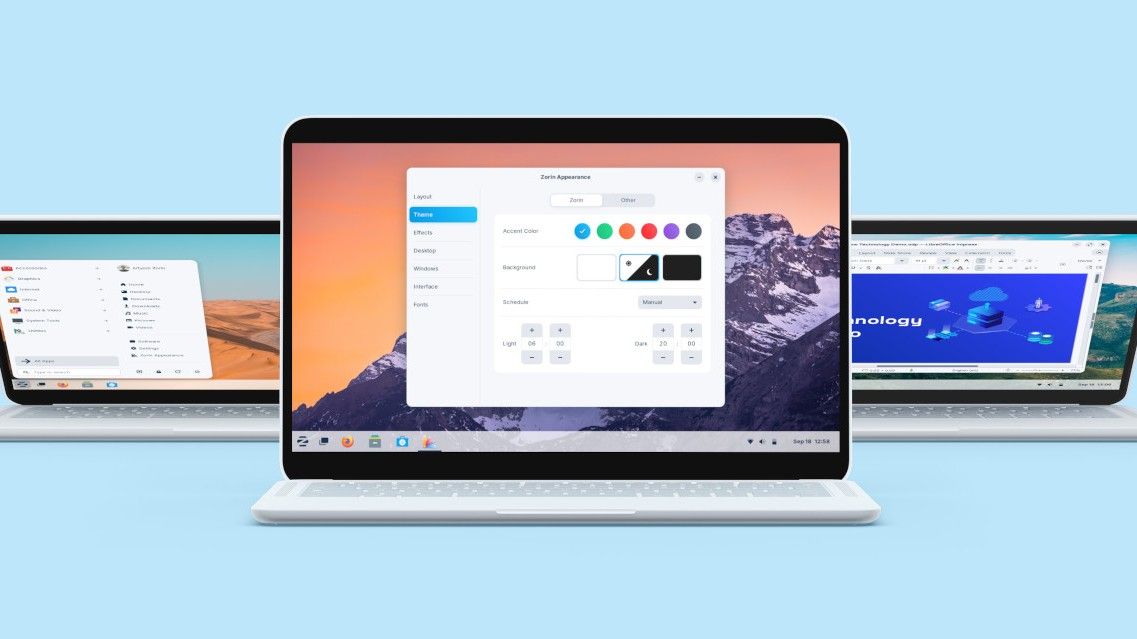
If you’re switching away from Windows and looking into Linux, two names come up constantly: Zorin OS and Linux Mint. Both are designed for Windows switchers. Both are free. Both are based on Ubuntu.
So which one should you choose?
This comparison breaks down the real differences between the two — no jargon, no filler. By the end, you’ll know which one fits your situation.
The Short Answer
- Choose Zorin OS if you want the most Windows-like interface out of the box and the most polished first-boot experience
- Choose Linux Mint if you want a stable, proven workhorse with more desktop environment options and a slightly larger community
Both are excellent. Neither is wrong. The difference is mostly in priorities.
Background: What Are These Distros?
Zorin OS is made by Zorin Group, a small company based in Dublin. It’s built on Ubuntu 22.04 LTS and uses a custom GNOME-based desktop called Zorin Desktop. The explicit goal is to make Linux feel like Windows.
Linux Mint is a community-driven project that started in 2006. It’s one of the most popular Linux distributions in the world. It uses its own desktop environment called Cinnamon (though MATE and Xfce editions also exist). Like Zorin OS, it’s based on Ubuntu.
Both projects prioritize ease of use for newcomers. Both work well out of the box. The differences are mostly in aesthetics, philosophy, and a few practical details.
Interface Comparison
Zorin OS
The default Zorin OS desktop is built on GNOME with heavy customization. It features:
- Taskbar at the bottom
- Windows-style app launcher (bottom-left corner)
- GNOME apps with Zorin’s visual theme
- Zorin Appearance panel for switching desktop layouts
The interface is polished and modern. It looks like a clean version of Windows 10/11. The visual quality is consistently high — fonts, icons, window decorations, and animations all feel intentional.
Linux Mint (Cinnamon)
Linux Mint’s Cinnamon desktop is also taskbar-at-bottom with a bottom-left app menu. It’s been doing the “Windows-like layout” thing since 2011 and is excellent at it.
Where Mint differs: Cinnamon is a full, traditional desktop environment built from scratch by the Mint team. It has more configuration options than Zorin’s GNOME setup. You can tweak panel behavior, applets, desklets, and themes in fine detail.
The look is clean but slightly more utilitarian than Zorin OS. Zorin is more visually polished; Mint is more functionally configurable.
Winner: Tie (depends on priorities)
If you want it to look like Windows with no tinkering: Zorin OS. If you want more control over every aspect of the desktop: Mint Cinnamon.
Installation Experience
Both offer graphical installers that are beginner-friendly.
Zorin OS uses a customized Calamares installer. It’s clean, fast, and the checkbox for third-party drivers/codecs during setup handles most compatibility issues automatically.
Linux Mint uses the Ubiquity installer (the same one Ubuntu uses). It’s slightly more traditional-looking but equally straightforward. Mint also offers the third-party drivers option during install.
Both take about 20–30 minutes to install. Both can be tried from a live USB before committing.
Winner: Tie
Both are equally accessible. Zorin’s installer looks slightly more modern; Mint’s is more familiar if you’ve seen Ubuntu installers before.
Performance
Both distros run well on modern hardware. The comparison gets more interesting on older machines.
| Spec | Zorin OS Core | Zorin OS Lite | Linux Mint Cinnamon | Linux Mint Xfce |
|---|---|---|---|---|
| Minimum RAM | 2 GB | 512 MB | 2 GB | 512 MB |
| Idle RAM usage | ~900 MB | ~400 MB | ~700 MB | ~350 MB |
| Recommended RAM | 4 GB | 2 GB | 4 GB | 2 GB |
On the same hardware, Mint Cinnamon typically uses slightly less RAM than Zorin OS Core (because Cinnamon is lighter than GNOME). For machines with exactly 2–4 GB RAM, this can make a noticeable difference.
For very old hardware (< 2 GB RAM), both projects have lightweight editions: Zorin OS Lite (XFCE) and Linux Mint Xfce perform comparably.
Winner: Linux Mint (slightly)
Cinnamon is lighter than Zorin’s GNOME-based desktop, which matters on borderline hardware.
Software and App Support
Both distros support the same software — they’re both based on Ubuntu, so the same apt packages, Flatpaks, and Snaps are available.
Both include:
- LibreOffice (full office suite)
- Firefox
- Software manager for installing apps
- Flatpak support (Flathub)
Zorin OS uses GNOME Software as its app store front-end. It’s visually polished.
Linux Mint uses its own Software Manager, which many users find faster and easier to navigate than GNOME Software.
The software catalog is identical — same repositories, same packages. The difference is the UI of the app store.
Winner: Tie
Same software available. Mint’s Software Manager is arguably easier to use; Zorin’s is more visually polished.
Community and Support
Linux Mint has been around since 2006. It has one of the largest and most active Linux communities. The Mint forums are extensive, with answered questions going back nearly two decades. Finding solutions to common problems is easy because someone has almost certainly had the same issue before.
Zorin OS has a smaller community. The official forum at forum.zorin.com is active and friendly, but it doesn’t have the depth of years of Q&A that Mint has accumulated.
For beginners who run into problems and need to search for answers: Mint’s larger community means more available help.
Winner: Linux Mint
Update Cadence and Long-Term Support
Both base their releases on Ubuntu LTS (Long-Term Support) versions, which are supported for 5 years.
- Zorin OS 17 is based on Ubuntu 22.04, supported until 2027
- Linux Mint 22 is based on Ubuntu 24.04, supported until 2029
Mint is currently on a newer Ubuntu base, which means slightly more current packages and a longer support window on the current release. Zorin OS 18 (based on Ubuntu 24.04) will close this gap when it releases.
Winner: Linux Mint (currently)
Mint 22 runs on Ubuntu 24.04 LTS with support through 2029; Zorin OS 17 runs on Ubuntu 22.04 through 2027.
Side-by-Side Summary
| Category | Zorin OS | Linux Mint |
|---|---|---|
| Visual polish | ⭐⭐⭐⭐⭐ | ⭐⭐⭐⭐ |
| Configurability | ⭐⭐⭐ | ⭐⭐⭐⭐⭐ |
| Performance on old hardware | ⭐⭐⭐⭐ | ⭐⭐⭐⭐⭐ |
| Installation ease | ⭐⭐⭐⭐⭐ | ⭐⭐⭐⭐⭐ |
| App ecosystem | ⭐⭐⭐⭐ | ⭐⭐⭐⭐ |
| Community size | ⭐⭐⭐ | ⭐⭐⭐⭐⭐ |
| LTS support window | Through 2027 | Through 2029 |
| Cost | Free (Pro optional) | Free |
Who Should Choose Zorin OS?
- You want a desktop that looks as close to Windows as possible immediately after install
- You prefer a polished, consistent visual experience over deep customization
- You’re comfortable with a smaller community and the official support channel
- You like the idea of a company (Zorin Group) actively maintaining the product with a commercial stake
Who Should Choose Linux Mint?
- You want slightly better performance on borderline hardware
- You value deep desktop configurability — tweaking panels, applets, themes in detail
- You want a larger community for troubleshooting help
- You prefer the Cinnamon desktop’s traditional, more utilitarian feel
- You want the longer Ubuntu 24.04 support window
The Bottom Line
Both Zorin OS and Linux Mint are excellent choices for Windows switchers. There’s no bad option here.
If you’ve never used Linux before and want the gentlest possible transition, Zorin OS is slightly more welcoming — the interface is more polished, the first-boot experience is more guided, and the Windows resemblance is more deliberate.
If you’re willing to spend a bit more time exploring settings and want a lighter system with a massive community behind it, Linux Mint Cinnamon is outstanding.
Either way, you’re getting a free, secure, modern operating system that will serve you well.
For a broader look at the Linux landscape, our guide to the best Linux distros for beginners covers more options beyond these two. Or if you’re ready to make the switch, our Windows 10 to Zorin OS migration guide walks through the full process step by step.